Skip to content

Security, accessibility and reliability

Built to maintain trust

A progression decision is only as defensible as the system behind it. Masterymark protects your data, your learners and your decisions. Each institution's data stays separate in its own region, people sign in through your identity provider, every action is logged, and questions are checked for accessibility before they publish. This page answers what IT, security, accessibility and procurement reviewers ask.

Your data

Kept separate, in your region

Each institution is a logically separate tenant with a declared region. Its residency posture can be exported for your procurement review.

  • No commingling of one institution's data with another's
  • Data kept in your declared region
  • A residency report you can hand to procurement
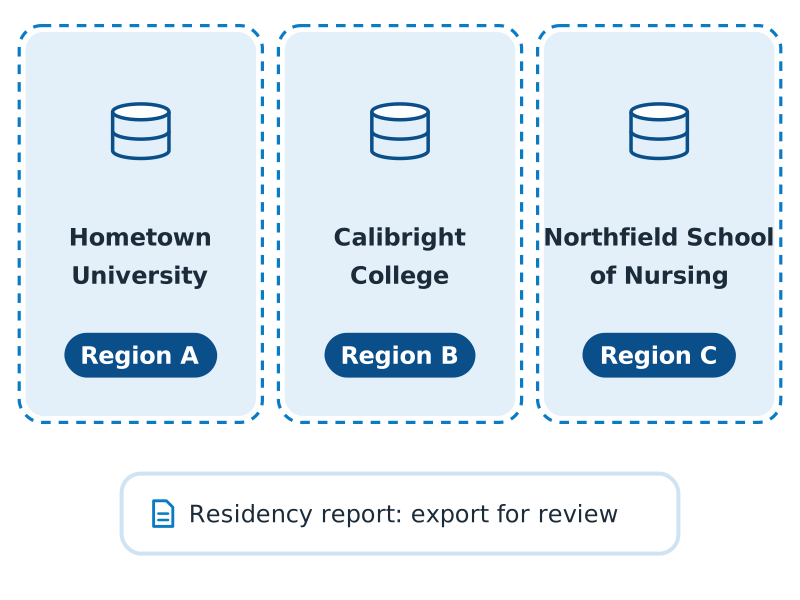
Three separate data stores for Hometown University, Calibright College and Northfield School of Nursing, each in its own outlined container and its own region, above a residency report card.

Access and audit

Every action on the record

People sign in through your institution's identity provider, and roles set what each person can see and do. An append-only audit log records who did what to which record, so a decision years later can be reconstructed as things stood.

  • Single sign-on through your identity provider
  • Roles that match how your institution is organized
  • An append-only audit log that can't be edited
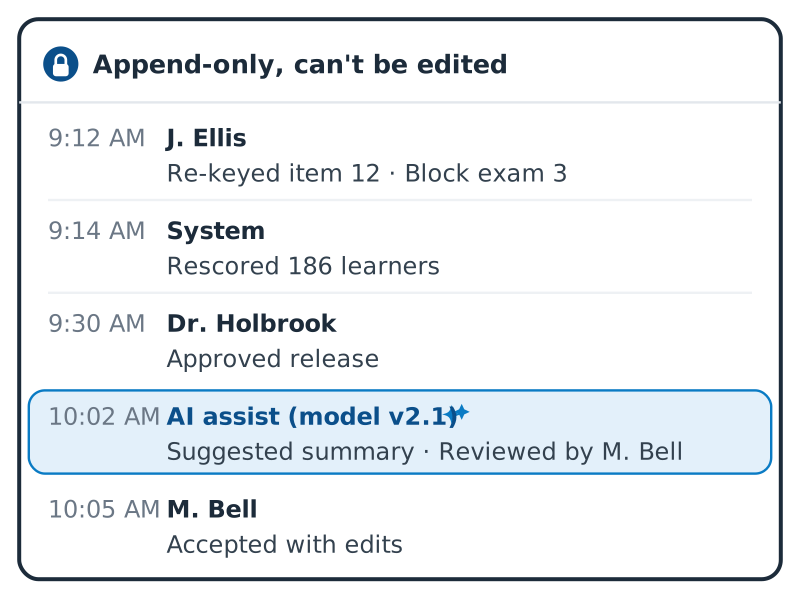
An append-only audit log of five timed entries: a re-keyed item, a rescore of 186 learners, an approved release, an AI-suggested summary (model v2.1) reviewed by M. Bell, and M. Bell accepting it with edits.

Accessibility

Accessible as it's written

The questions and exams your faculty write are checked against your institution's accessibility standard (such as WCAG 2.2 AA, the Web Content Accessibility Guidelines) as they're written. A missing image description or table header blocks publishing until it's fixed, so inaccessible questions never reach learners.

  • Questions checked against your accessibility standard before they publish
  • Accommodations approved once and applied everywhere
  • Proctors and markers see only what to apply, never the diagnosis
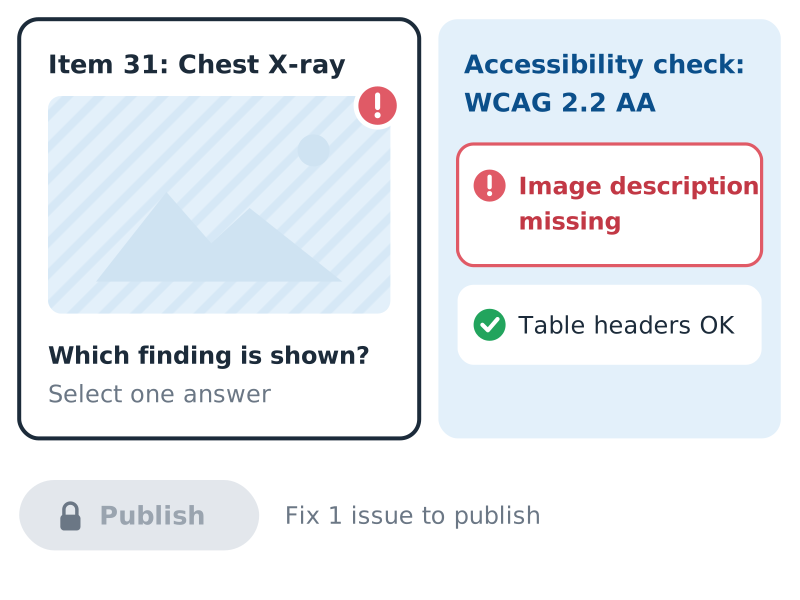
A question being authored, "Item 31: Chest X-ray", with an image flagged by a WCAG 2.2 AA accessibility check for a missing image description while table headers pass, and a locked Publish button: fix 1 issue to publish.

AI

A person stays in charge

AI features are opt-in, and your data is never used to train AI models.

  • Every AI-assisted step logged with the model version and a named reviewer
  • No AI-proposed summative outcome released without a person
  • Grounded tools: the study tutor answers only from your curriculum, and AI patients only from the authored case
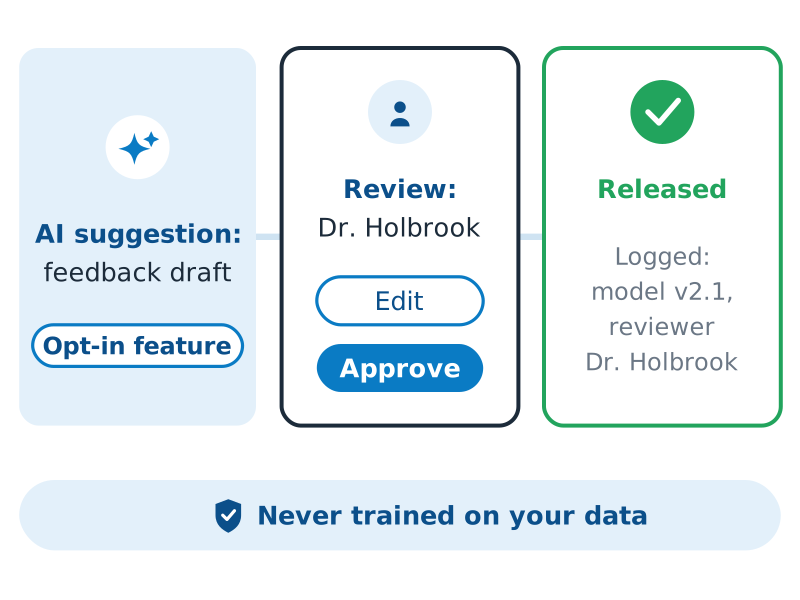
Three steps from left to right: an opt-in AI feedback draft, a review by Dr. Holbrook with Edit and Approve, and the released result logged with model v2.1 and the reviewer, above a banner reading "Never trained on your data".

Open standards

Your data moves through open standards

  • CASE

    Competency frameworks, such as EPAs or a nursing skills matrix, move in and out without being rebuilt by hand.

  • QTI 3.0

    Bring an existing item bank, and take your items with you.

  • LTI 1.3

    Learners launch Masterymark from your LMS, Elentra included, and grades go back to the gradebook.

  • OneRoster

    Class lists and enrollments come from your student information system or LMS.

  • Caliper

    Learning events stream to your analytics and data platforms in a standard format.

  • Public API

    A documented API for everything else, plus a feed to your data warehouse on a versioned schema.

Reliability

Built for exam day

  • Load-rehearsed exam days

    High-stakes exam days are rehearsed under load before they happen.

  • OSCEs without internet

    OSCE circuits keep running if the connection drops.

Security questions

Questions reviewers ask

Where will Masterymark be hosted?

Each institution's data is kept in its declared region, in a logically separate tenant. Talk to us about your region's requirements.

How do people sign in?

Through your institution's identity provider, with single sign-on. Roles set what each person can see and do, to match how your institution is organized.

Can we see who changed a record?

Yes. An append-only audit log records who did what to which record, and it can't be edited, so a decision years later can be reconstructed as things stood.
Can we get our data out?

Yes. Data moves in and out through open standards: CASE for frameworks, QTI 3.0 for items, LTI 1.3 for LMS launch and grades, OneRoster for rosters and Caliper for learning events. A documented public API and a feed to your data warehouse cover everything else.

How does Masterymark handle accessibility?

In two ways.

Accessible questions. Everything your faculty write in Masterymark, such as questions and exams, is checked against the accessibility standard your institution sets (for example WCAG 2.2 AA, the Web Content Accessibility Guidelines). If something would be hard to use with a screen reader or other assistive technology, such as an image with no text description or a table with no headers, it can't be published until it's fixed.

Accommodations set up once. When a learner has an approved accommodation, such as extra time, it's recorded once and applied automatically to every quiz, exam and OSCE it covers, so nobody has to set it up again for each one. Proctors and markers see only what to apply, never the reason for it.

Be among the first to use Masterymark

Masterymark Early Access is open to colleges and universities in North America. Apply to try it with your own program's assessments, or sign up for updates.